
What really happened to Amazon? Anatomy of a DNS failure in us-east-1
Let's talk about someone else's trouble for a change. It's not exotic: plenty of us have been through a DNS outage ourselves. But this one hit the biggest AWS region and a lot of the applications built on top of it.
And yes, it was DNS again. AWS published a detailed post-event summary, but it's a lot of text. Here's the TL;DR. All times below are Pacific Daylight Time (PDT), as in the AWS summary.
- 11:48 PM, October 19: DynamoDB's regional endpoint in us-east-1 lost all its IP addresses. Everything that connected to DynamoDB through that endpoint, including many AWS services, started failing.
- 2:25 to 2:40 AM, October 20: DNS was fixed and DynamoDB recovered, about three hours after the start.
- Until 1:50 PM: launches of new EC2 instances kept failing or came up without network connectivity.
- 5:30 AM to 2:09 PM: some Network Load Balancers had increased connection errors.
- 2:20 PM, October 20: the event ended, about 14.5 hours after it began.
How DynamoDB manages its DNS
DynamoDB runs a huge fleet of load balancers and keeps hundreds of thousands of DNS records for them. Automation updates those records all the time: it adds new capacity, removes failed hardware and spreads traffic.
That automation has two parts:
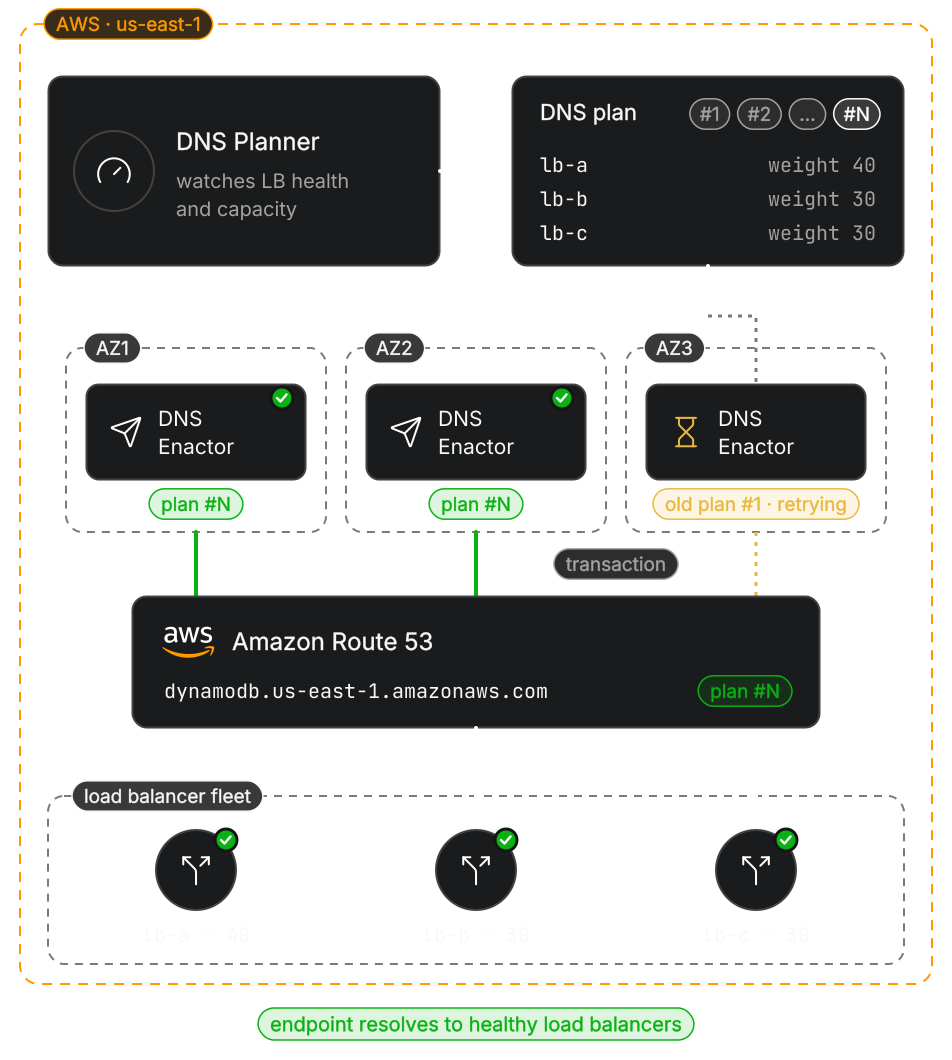
- DNS Planner monitors the health and capacity of the load balancers and regularly creates a new DNS plan for each endpoint: a set of load balancers and their weights.
- DNS Enactor applies those plans in Amazon Route 53. For resiliency it runs as three fully independent copies in three different Availability Zones. Each copy picks up new plans and writes them to Route 53 in a transaction.
The race condition
The root cause was a latent race condition between two DNS Enactors.
Before applying a plan, an Enactor checks once that its plan is newer than the one already applied. Then it works through the endpoints one by one, and if another Enactor is updating the same endpoint, it waits and retries.
Right before the event, one Enactor got unusually slow and kept retrying several endpoints. Meanwhile, the Planner produced many newer plans, and a second Enactor applied one of them quickly to all endpoints. Then three things happened almost at once:
- The second Enactor finished and started a clean-up job that deletes plans much older than the one it just applied.
- The slow Enactor reached the regional endpoint and applied its old plan over the new one. Its "is my plan newer?" check had been done long before, so nothing stopped it.
- The clean-up job deleted that old plan, because it was many generations behind.
Deleting the active plan removed all IP addresses from the regional DynamoDB endpoint in us-east-1. The system was left in an inconsistent state, so no Enactor could apply new plans anymore. Engineers had to fix it by hand.
From 11:48 PM, everything that reached DynamoDB in us-east-1 through the public endpoint got DNS failures: customer applications and internal AWS services alike. By 12:38 AM engineers found the cause, by 1:15 AM temporary fixes let some internal services connect again, and by 2:25 AM all DNS records were restored. Customers recovered between 2:25 and 2:40 AM, as cached DNS records expired. DynamoDB global tables in other regions kept working the whole time, only with replication lag to and from us-east-1.
Why EC2 took almost 14 hours to recover
DynamoDB was back in about three hours. EC2 took much longer, and that was the second, bigger part of the outage.
EC2 runs instances on physical servers that AWS calls "droplets". A subsystem called DropletWorkflow Manager (DWFM) manages them and keeps a lease with every droplet, checking in every few minutes. Those checks depend on DynamoDB. When DynamoDB went down, the checks failed, and leases slowly timed out. Instances that were already running weren't affected at all. But a droplet without a lease can't host new instances, so new launches failed with "insufficient capacity" errors.
When DynamoDB came back at 2:25 AM, DWFM tried to re-establish leases with the whole fleet at once. There were so many droplets that leases timed out before the work finished, the retries piled up in the queue, and DWFM went into what AWS calls congestive collapse. There was no ready procedure for this, so engineers moved carefully. At 4:14 AM they throttled incoming work and started restarting DWFM hosts selectively. By 5:28 AM all droplets had leases again.
The next bottleneck was Network Manager, the system that pushes network configuration to new instances. It had a big backlog of changes from the hours before, and from 6:21 AM network propagation got slow. New instances launched but had no network connectivity. By 10:36 AM propagation times were back to normal.
The last step was removing the throttles that had protected EC2 during recovery. Engineers started relaxing them at 11:23 AM, and at 1:50 PM all EC2 APIs and instance launches were working normally, about 14 hours after the event began.
How load balancers made it worse
New instances without network configuration caused a third problem. The Network Load Balancer health check system brought those instances into service, their health checks failed, then passed, then failed again. Healthy NLB nodes and targets kept getting removed from DNS and added back. The flapping overloaded the health check system and triggered automatic Availability Zone DNS failover, which took even more capacity out of service.
AWS noticed it at 6:52 AM and at 9:36 AM turned off automatic health check failover for NLB, which brought healthy capacity back. They turned it on again at 2:09 PM, after EC2 recovered.
Lambda, ECS, EKS, Fargate, Amazon Connect, STS, Redshift and AWS Support were also hit, because they depend on DynamoDB, new EC2 instances or NLB.
Why other regions felt it too
The us-east-1 region is special: some global AWS functions depend on it. During the event:
- customers who signed in to the AWS Management Console with root credentials or through identity federation configured to use the global sign-in endpoint got errors even in other regions, until 1:25 AM;
- Redshift customers in all regions couldn't run queries with IAM user credentials until 1:20 AM, because of a Redshift defect that called an IAM API in us-east-1.
So even if none of your workloads run in us-east-1, it can still be part of your critical path.
What AWS is changing
According to the post-event summary, AWS:
- turned off the DynamoDB DNS Planner and DNS Enactor automation worldwide until the race condition is fixed and extra protections against applying wrong DNS plans are in place;
- is adding a velocity control to NLB, which limits how much capacity a single load balancer can remove when health checks trigger AZ failover;
- is building an extra test suite for the DWFM recovery workflow;
- will improve throttling in EC2 data propagation, so incoming work is rate-limited based on the size of the waiting queue.
Lessons for your own infrastructure
You can't fix AWS's DNS automation. But you can check how your own setup would behave in the same situation:
- Map your hidden dependencies on us-east-1. Console sign-in, global endpoints and third-party services often depend on it even when your workloads don't. Where a service offers both, prefer regional endpoints to global ones (for example, regional STS endpoints), and know which of your vendors run there.
- Don't make recovery depend on launching new capacity. Running instances survived the whole event, while new launches failed for hours. Systems that keep enough capacity already running in each zone, the approach AWS calls static stability, ride out this kind of failure much better than ones that scale up to recover.
- Go multi-region only where it pays off. DynamoDB global tables in other regions kept serving requests. For data and services whose downtime costs more than a second region, that's the real protection. For the rest, a tested restore plan is enough.
- Retries need backoff and limits. DWFM collapsed under its own retries. Your clients can do the same to your database after an outage. Use timeouts, exponential backoff with jitter and a cap on retries.
- Limit what automation can remove. NLB's failover took healthy capacity out of service. If your own health checks or autoscaling can drain capacity, put a limit on how much they can take out at once, and know how to switch them off by hand.
This situation reveals a lot about how big systems fail: not from one dramatic mistake, but from a rare timing issue that automation can't repair on its own. If you want to know how your own setup would handle a regional outage like this, an infrastructure review is a good place to start. For companies in Europe, dependency on one provider is also a regulatory question: see what the EU Cloud Sovereignty Framework asks for.