
If you sign off on the cloud budget for a platform with many brands, regions or front doors, the WAF line in your Q1 forecast is built on a model that ends on January 31, 2027. For some setups that line is too high. For others it's far too low.
My claim is simple. From February your WAF bill depends on how many resources carry a web ACL and how much traffic goes through paid protections. The number of rules you run stops mattering. And you don't need to wait for the first invoice. You can model the new bill today from data already sitting in CloudWatch and Cost Explorer.
From February 1, 2027, AWS WAF bills protected resources and requests, not ACLs and rules
A per-resource fee, the same request fee and a premium request fee replace every charge that counted ACLs, rules and add-ons, so a forecast built on those counts stops holding.
The AWS WAF pricing page is blunt about what goes: the web ACL fee, the fees for rules and rule groups, capacity, body inspection, CAPTCHA and Challenge all disappear. Three things are billed instead from February 1, 2027: protected resources, requests and premium requests. Anything you use up to January 31, 2027 is still billed the old way.
Old vs new AWS WAF rates: the $0.60 request fee survives, and a fee per protected resource replaces every charge that counted ACLs and rules.Charge | Until Jan 31, 2027 | From Feb 1, 2027 |
|---|---|---|
Web ACL | $5.00 per month | removed |
Rule or managed rule group | $1.00 per month each | removed |
Protected resource | none | $0.01 per hour, about $7.30 a month |
Requests | $0.60 per million | $0.60 per million |
Bot Control common | $10.00 a month for each ACL, then $1.00 per million requests, 10 million free | included |
Bot Control targeted | $10.00 a month for each ACL, then $10.00 per million requests, 1 million free | premium request fee |
Fraud Control ATP and ACFP | $10.00 a month for each rule group on each ACL, request fees falling from $1,000.00 per million (first 2 million) to $50.00 | premium request fee |
Premium requests | none | $5.00 per million on top of the $0.60 base, $5.60 per million in total |
CAPTCHA | $0.40 per 1,000 attempts | included |
Challenge | $0.40 per million responses | included |
The AWS WAF pricing per million requests doesn't move. Everything around it does. When a premium protection inspects a request, you pay $5.00 per million on top of the $0.60 base, $5.60 per million in total, and AWS charges that premium once per request. That's from AWS's announcement on its Security Blog, as of 2026-11-23.
AWS's What's New post, as of 2026-11-23, puts protections like Fraud Control, API Security, AI Security and the targeted level of Bot Control in the premium tier. The same post lifts the free capacity per web ACL to 2,500 WCU, from 1,500, and says rule edits no longer move your rate. For years rule count was a cost lever. From February it's a config detail.
One web ACL on many resources is the setup that pays more
The request fee stays put, so the bill moves on the fixed part: $5 per ACL plus $1 per rule before, $7.30 per protected resource after, and an ACL with 10 rules on 3 or more resources pays more.
Do the break-even once and it sticks. Without paid protections, an ACL with 10 rules costs $15.00 a month on the old model. On the new one, 2 resources behind it cost $14.60 and 3 cost $21.90. Two is roughly a wash. Three is where you start paying extra.
AWS says the same on its pricing page. Attach one web ACL to 10 resources and you're billed for 10 protected resources, and AWS warns that accounts spreading protection over lots of resources with little traffic on each "may pay more". AWS's own example: one web ACL across 50 ALBs carrying 2 million requests comes to $366.20 a month.
Five setups, our calculation at AWS's published rates, as of 2026-11-24: shared ACLs on many resources pay up to x4.36, heavy traffic with Bot Control common pays less than half.Setup | Old bill a month | New bill a month | Multiple |
|---|---|---|---|
One app: 1 ACL with 10 rules on 1 ALB, 10M requests | $21.00 | $13.30 | x0.63 |
20 brands sharing 1 ACL with 10 rules on 20 CloudFront distributions, 40M requests | $39.00 | $170.00 | x4.36 |
5 brands with CloudFront plus ALB: 2 ACLs with 10 rules each, 10 resources, 50M requests through both layers | $90.00 | $133.00 | x1.48 |
1 ACL with 15 rules on 2 CloudFront distributions, 500M requests, Bot Control common on all | $820.00 | $314.60 | x0.38 |
1 ACL with 10 rules on 1 CloudFront distribution, 200M requests, Bot Control targeted on 20M login requests | $335.00 | $227.30 | x0.68 |
The model assumes 730 hours a month, no WCU or body inspection surcharges, and every rule and managed group at $1.00 before.
The last two rows are where AWS WAF Bot Control pricing changes most. Bot Control common stops being a subscription plus a request fee and becomes part of the base price. Targeted Bot Control moves to the premium fee, charged only on the requests it inspects.
Now a real one. One of our clients is an iGaming platform. In production it runs 1 web ACL on 1 ALB with 42 rules (4 AWS managed rule groups, 1 rate-based rule, 37 custom rules for integrator IP allowlists, path blocks and label-based exceptions), about 25 million requests a month, and no Bot Control, Fraud Control, CAPTCHA or Challenge. Its actual WAF bill for 2026-10-25 to 2026-11-24 (the last day not yet closed) was $61.06: $41.07 for rules, $14.97 for requests, $5.02 for the web ACL.
On the old pricing that's about $62 a month: $5 for the ACL, $42 for rules, $15 for requests. On the new pricing it's $7.30 for the one protected resource plus the same $15 for requests, about $22.34. Down 64%.
Two thirds of the old bill was the rule fee, and nobody questioned it because nothing was failing. That's infrastructure that costs more than it should while nothing is broken, in one line item. The new model deletes it for you.
Model your AWS WAF cost for February today from CloudWatch and Cost Explorer
Count resources per web ACL, read requests per ACL from CloudWatch, add the requests paid protections inspect, and price them at the three new fees.
Start with what counts. Eight resource types do: Application Load Balancers, CloudFront distributions, Cognito user pools, AppSync GraphQL APIs, stages of API Gateway REST APIs, Amplify apps, App Runner services and Verified Access instances. CloudFront SaaS Manager is the trap for multi-tenant platforms: AWS bills every tenant as its own protected resource, so count those first.
Then the current bill by component. An AWS Cloud Financial Management post, written for the old model, gives the route: "Filter by Service = AWS WAF" in Cost Explorer and group by Usage Type. The Cost and Usage Report goes finer if you need it.

On that account the rule line is the biggest of the three, larger than requests and the web ACL put together.
That view showed three usage types: EU-WebACLV2, EU-RuleV2 and EU-RequestV2-Tier1. The rest came from two more consoles in one read-only pass. The WAF console gave the rule count: 42 rules at 1277 WCU, so no capacity surcharge. The web ACL's associated resources gave the resource count: 1 ALB. On this one production account, CloudWatch (namespace AWS/WAFV2, Rule = ALL) gave 25,058,909 requests evaluated, 4,492 blocked and 6,748 counted for 2026-10-25 to 2026-11-24.
That's the whole input. Resources times $7.30, requests at $0.60 per million, premium requests at $5.00 per million on top, and you have February.
Two things misled us on the first pass:
- A Cost Explorer view filtered by usage type but not grouped by it shows one WAF total with no split. You can't price a lump.
- The current day is partial in both tools, and CloudWatch and Cost Explorer cut it at different hours. Our first pass compared two different windows. Use the same dates in both, and end the window on yesterday if you need the two to match to the cent.
The limits are plain. These are the rates AWS published at launch, so check the pricing page on the day you run the model, and check whether a private pricing agreement covers your account. That account also has no paid protections, so it doesn't test the premium side of the model.
Tested on a production AWS account, read-only, 2026-11-24.
Protect once where you can, and send premium rules only the paths that need them
The levers left are how many resources carry an ACL, how many ACLs inspect the same request, and how much traffic reaches premium protections.
The antipattern is a web ACL on CloudFront and another on the ALB behind it. AWS's announcement says every web ACL a request passes through bills it separately, and that a single ACL at CloudFront can come out cheaper than ACLs on many resources sitting behind it.
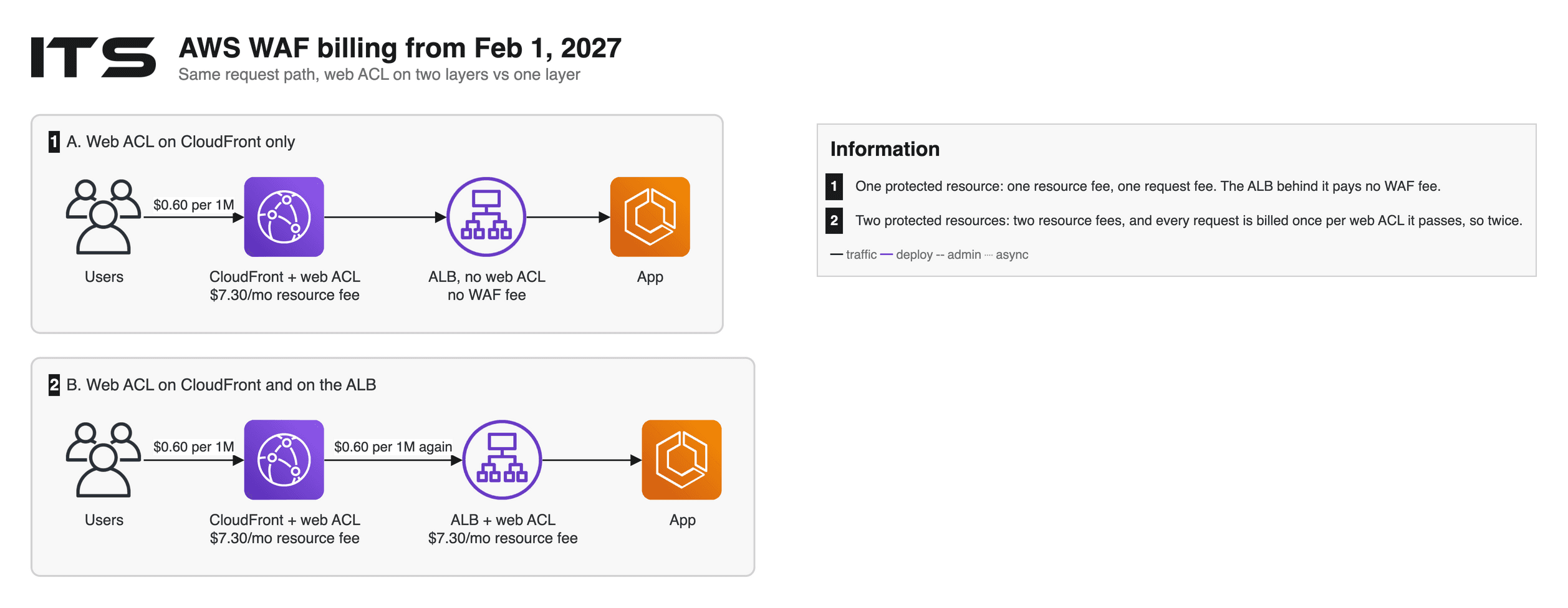
The two-ACL path pays two resource fees and bills every request twice; the CloudFront-only path pays one of each. The fees in the diagram are AWS's published rates, not a client's setup.
Warning: drop the ALB's web ACL only when the ALB can't be reached around CloudFront. Otherwise you've cut a fee and opened a side door.
Premium is the second lever. The premium fee applies only to requests a premium rule group actually looks at. If an earlier rule settles a request, or a scope-down statement keeps it out of the group, it pays the $0.60 base and nothing more. Put targeted Bot Control on the login path, not on every image and stylesheet. That's what the last row of the table does: 20M login requests out of 200M.
Fixed costs like these survive because nothing breaks. The same pattern sat in a database setting, see how fixing one Aurora setting saved an iGaming operator about $90K a year.
Rule cleanup stops being a saving and becomes a risk decision
Rule count no longer moves the bill, so prune count-mode rules, duplicate managed groups and unpinned versions for enforcement reasons, not for savings.
The wrong reason to clean up in January is to cut the rule fee. The fees for rules, rule groups and capacity go away. Deleting stale rules saves nothing from February.
What does save money is the association. The resource fee runs only for the hours a web ACL is attached, so a web ACL still attached to an ALB or a distribution you no longer use is a fee you can delete. So is a web ACL that protects nothing: today it still pays the ACL and rule fees.
The right reason to clean up is enforcement. Two things are worth checking in any WAF kept in Terraform or Terragrunt while you're already in the rule lists. While new rules are tuned, they sit in count mode and the rest block, so a managed rule group left out of the count list skips that tuning and blocks from day one. And a managed group that isn't pinned to a version changes what it blocks whenever AWS updates it, with no change in your repo.
Neither shows up on an invoice, old model or new. Pin the versions, check the count list against what's actually being tuned, and do it while you're already in the rule lists for the pricing switch.
Most customers pay less, but a Q1 forecast on the old model is already wrong
AWS keeps current pricing until the switch and says most customers will pay less, so the deadline is your own budget cycle: run the model, name an owner, then check the first month on the new model.
AWS's line is that most WAF customers will pay less. For few resources and heavy traffic, I agree: the iGaming account above drops 64%, and the Bot Control common row falls to x0.38. But the same pricing page warns that lots of lightly used resources can push a bill up, and the shared-ACL row is exactly that customer at x4.36. A forecast that multiplies ACLs and rules is wrong either way: too high for one shape, too low for the other.
Nothing forces you to move early. Until February 1, 2027 you stay on today's prices, and AWS says nothing changes for private pricing agreements until they expire, for Shield Advanced subscribers or for CloudFront flat-rate plans. The real deadline is the budget you're signing now.
Measure your own case like this:
- List every web ACL and the resources associated with each, counting CloudFront SaaS Manager tenants one by one.
- Pull 30 closed days of requests per ACL from CloudWatch, plus the requests your premium rule groups inspect.
- Price them at the three fees: $7.30 per resource a month, $0.60 per million requests, $5.00 per million premium requests on top of the base.
- Compare the result with your actual WAF line in Cost Explorer, grouped by Usage Type.
- Clean up for enforcement reasons, and detach web ACLs from resources you've retired.
- Name one owner for the WAF line and set a Cost Explorer check for the first month on the new model.
If you'd rather have it done, it should be a review that ends in a plan, not a new dependency. Send us 30 days of your WAF metrics and the WAF line from Cost Explorer, and as part of a cloud infrastructure review we'll model your February bill against the three new fees and list the rules to clean up before the switch.