
Magento Multi-Store shop in Docker

Alex KondratievAlex Kondratiev

3 min read

The owner of the Magento multi-store shop wanted to be ready for big volumes of traffic coming after his marketing campaigns and on Black Friday, particularly. The solution of our DevOps engineers was designed in a way that will allow manual scaling up and down.


Magento Multi Store shop designed for high load
magento

Goals, needs, and wants

The goal of the solution was to create redundant, stable, and lightweight infrastructure for a Magento multi-store shop at the same time. The client had a development team working on the shop's updates and functionality improvement, so we suggested implementing Continuous Integration and Continuous Deployment into their workflow to ease the development process and prevent various errors and issues, that may arise during direct deployment to production.

Containerized and automated solution

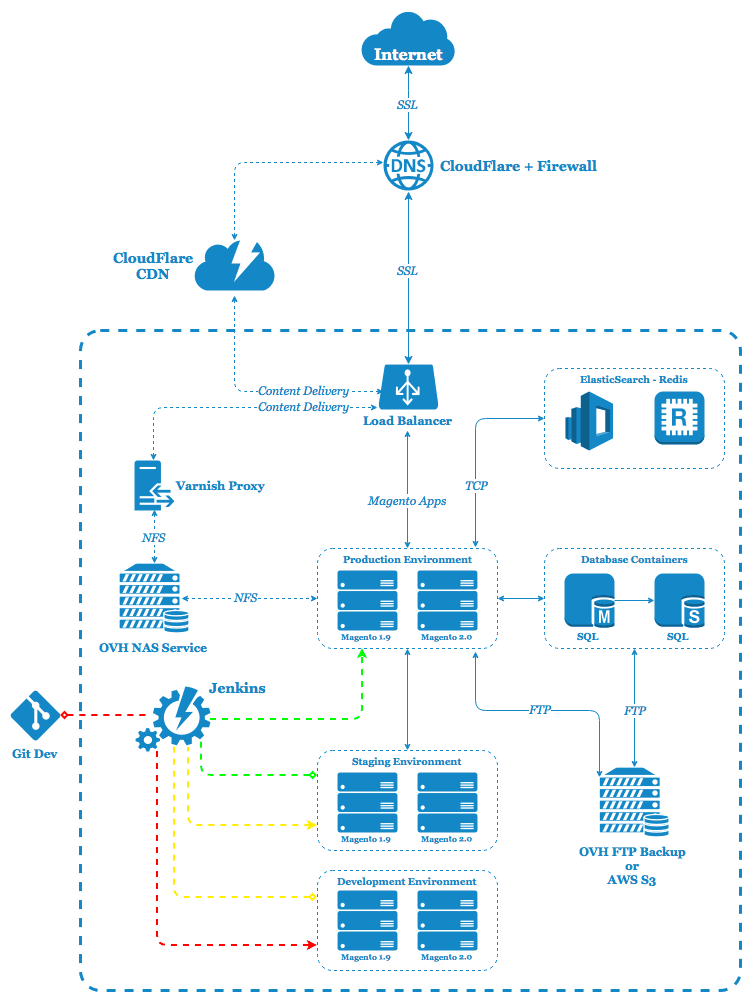
We divided the whole infrastructure into independent parts, which were packed with Docker. For the container's orchestration, we used Rancher. For deployment automation, Jenkins was chosen.

Ansible playbooks were used to automate the environment's configuration infrastructure components interaction. Jenkins interacted with the client's GitHub, where the application's code was stored.

Proofs

Tests showed that infrastructure successfully handled ~86000 visitors at one time. Load balancing was implemented with HAproxy which distributed the load between 2 production environments.

CI & CD allows us to deploy the code to Development env and test new functionality there. After successful review, the code goes to Staging env, where it's kept until the final review of the QA responsible. After his final approval, he pushes the changes to Production env.

Results and more

The result of our work can be seen on the right. The goals, needs, and wants of our client were fully covered by the provided solution. Besides Dockerization we also performed backend optimization and provided comprehensive information to the development team regarding the application's performance bottlenecks and security leaks, as the most qualitative product should be tuned and secured from all sides.

Alex Kondratiev

Alex Kondratiev

Founder of ITsyndicate. DevOps Enthusiast with 15+ years of experience in cloud, Infrastructure as Code, Kubernetes, and automation. Specialized in architecting secure, scalable, and resilient systems.

An Infrastructure Review Should Give You a Plan, Not a Dependency

Why we want the review to be useful even if your own team does all the work afterward. Of course we want to help with the implementation. We are an engineering company. We like solving infrastructure problems, and we want relationships where we can take responsibility for the work over time. So why offer an Infrastructure Review that a client can take back to their own team? Because I want the first engagement to earn its fee on its own, the client should leave with a better understanding of their situation, clear priorities, and a practical next step. They can then decide whether they want us to carry out the changes. That is the principle behind how we are building our Infrastructure Review. It shapes what we agree to investigate, how we explain our findings, and what the client can do with them afterward.

Your Infrastructure Can Be Expensive Even When Nothing Is Broken

A quiet production environment can still hide rising costs, wasted engineering capacity, and risks that appear only during growth or recovery. A familiar weekly update sounds like this: production is stable, the latest release went out, and there were no serious customer complaints. The cloud bill is higher again, but there is probably a reasonable explanation. One engineer spent half a day helping with the release, another fixed a monitoring issue, and the database may need attention next quarter. Nothing is broken badly enough to become a leadership problem. That is exactly why the underlying problem can survive for so long. I have seen this pattern more than once. Production looks stable, while senior engineers quietly spend much of their time keeping it that way. The platform works, but the company is paying for that stability through cloud spend, manual effort, slower releases, and assumptions about growth or recovery that nobody has tested recently. Infrastructure doesn’t need to cause an outage to become expensive. Outages are obvious. Inefficiency is quieter, and it can keep working for years while charging you for the privilege.

How to Run a Docker Container on Your Local Machine

This article is a quick, hands-on guide to running Docker locally. It walks through essential CLI commands for managing images and containers (build, pull, run, ps, start/stop, rm/rmi) and shows how to automate image creation with a Dockerfile. You’ll build an image, run a container with port mapping, verify it’s running, and learn tips for environment setup - everything you need to spin up and manage local containers efficiently.

Stay online.
Stay in command.