

Nvidia Docker. Dockerized CUDA driver for video surveillance

Alex KondratievAlex Kondratiev
Pavlo KonobeyevPavlo Konobeyev

2 min read

Nvidia docker. Microservices dockerization and automation for city-wide video surveillance


Overview

Our client has 900+ video cameras that are located all over the city. The idea of this project was to collect recorded videos and store them on dedicated servers, where certain scripts were executed to analyze them. The infrastructure needed to be scalable with a fully automated development process that gives the opportunity to make dynamic changes in scripts.

So, the draft is placed on dockerization, orchestration, and automation of software being developed, which uses video cards and GPU's for calculations.
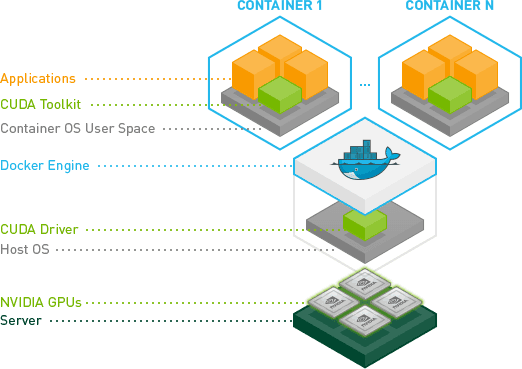
nvida docker

The purpose of this project was to build scalable infrastructure, that will work with microservices that are connected with Nvidia CUDA (Compute Unified Device Architecture).

We have configured Continuous Integration & Continuous Delivery in such a way, that when the updated script is pushed into the production environment on all servers, there is always an opportunity to get back to the previous version in one click in case of code error!

One of our tasks was to orchestrate Docker with Rancher, but we faced one issue - Rancher doesn't work correctly with the Nvidia docker plugin, so we have developed our custom solution that handled this problem.

We have also implemented monitoring with a visual interface to see the stats and various metrics of the servers and their components, beginning from hardware stats like temperature and power distribution, and ending with software stats like interface load, process state, etc.

If you need help with the configuration of such infrastructures just ping us and let us carry about all tasks on the infrastructure side.

Focus on your business and let the professionals do their job!

Alex Kondratiev

Alex Kondratiev

Founder of ITsyndicate. DevOps Enthusiast with 15+ years of experience in cloud, Infrastructure as Code, Kubernetes, and automation. Specialized in architecting secure, scalable, and resilient systems.

An Infrastructure Review Should Give You a Plan, Not a Dependency

Why we want the review to be useful even if your own team does all the work afterward. Of course we want to help with the implementation. We are an engineering company. We like solving infrastructure problems, and we want relationships where we can take responsibility for the work over time. So why offer an Infrastructure Review that a client can take back to their own team? Because I want the first engagement to earn its fee on its own, the client should leave with a better understanding of their situation, clear priorities, and a practical next step. They can then decide whether they want us to carry out the changes. That is the principle behind how we are building our Infrastructure Review. It shapes what we agree to investigate, how we explain our findings, and what the client can do with them afterward.

Your Infrastructure Can Be Expensive Even When Nothing Is Broken

A quiet production environment can still hide rising costs, wasted engineering capacity, and risks that appear only during growth or recovery. A familiar weekly update sounds like this: production is stable, the latest release went out, and there were no serious customer complaints. The cloud bill is higher again, but there is probably a reasonable explanation. One engineer spent half a day helping with the release, another fixed a monitoring issue, and the database may need attention next quarter. Nothing is broken badly enough to become a leadership problem. That is exactly why the underlying problem can survive for so long. I have seen this pattern more than once. Production looks stable, while senior engineers quietly spend much of their time keeping it that way. The platform works, but the company is paying for that stability through cloud spend, manual effort, slower releases, and assumptions about growth or recovery that nobody has tested recently. Infrastructure doesn’t need to cause an outage to become expensive. Outages are obvious. Inefficiency is quieter, and it can keep working for years while charging you for the privilege.

How to Run a Docker Container on Your Local Machine

This article is a quick, hands-on guide to running Docker locally. It walks through essential CLI commands for managing images and containers (build, pull, run, ps, start/stop, rm/rmi) and shows how to automate image creation with a Dockerfile. You’ll build an image, run a container with port mapping, verify it’s running, and learn tips for environment setup - everything you need to spin up and manage local containers efficiently.

Stay online.
Stay in command.